
Try OGGM online#
You can try OGGM in your web browser without having to install anything! This is the best way to run the tutorials or even do exploratory research to test the model, before you move on to more serious computations.
OGGM-Hub#

hub.oggm.org is our own JupyterHub deployment of OGGM on our servers in Bremen. It works similarly to MyBinder or Google Colab, but it is bound to a username (you’ll need an account) and is therefore persistent (your files are saved between sessions). It also gives you access to more computing resources than most free services.

In order to be able to log in, you will need to have a (free) user account. It is super easy, just Get in touch if you want to try it out! Please briefly introduce yourself and tell us why you would like an account, so that we can guide you towards the next steps.
Warning
hub.oggm.org is still experimental and we cannot guarantee that your work will always be safe here. We will do our best, but, you know, we are scientists after all. Please, make a copy of your files from time to time!
How does this work?#
We use a single compute node located in Bremen to welcome the hub users.
Currently (we are still trying things out) each user gets enough CPUs (4) and
enough RAM (8Gb) to run OGGM on several glaciers at once.
This is not enough to do heavy work, but will get you through the exploratory
phase or even small regional runs. Each user also gets a persistent 16Gb disk
to save output data, notebooks and scripts. The OGGM-specific input data
(i.e. everything that is downloaded automatically between users, see
system settings) is shared among
users (the shared folder in your $HOME). The first time you run a
new glacier, OGGM will first check if the data is available in the shared folder,
and if not it will download it for you and the other users.
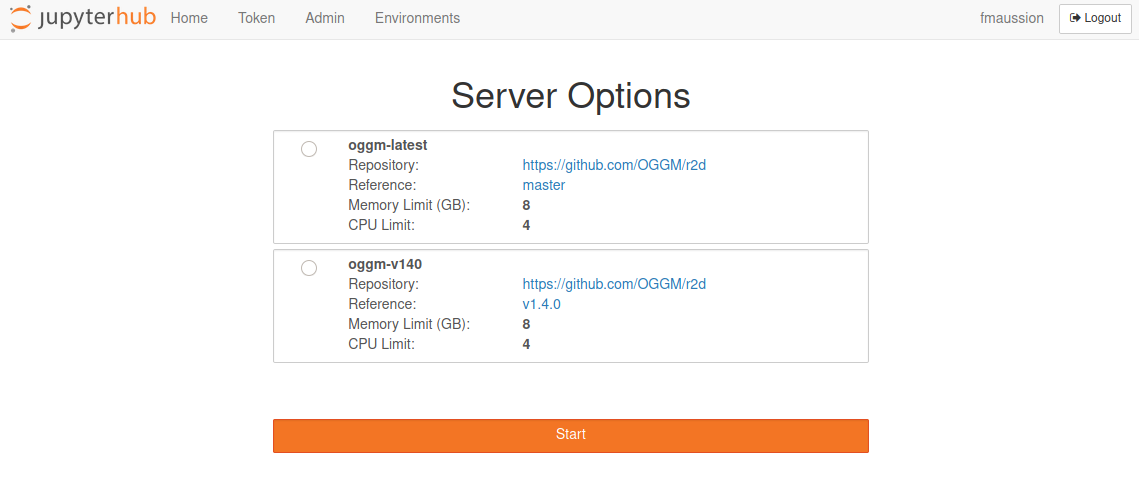
Welcome screen of https://hub.oggm.org#
When logging in, you can choose between several environments. We suggest to
pick the latest OGGM version if you are not sure, and in general stick to
whatever worked for you last time.
These environments are restarted each time you log-out and log-in again
(don’t worry, your HOME and all it contains won’t be erased!). This means
that while you can install things in the root tree (e.g. with pip install),
it won’t be there the next time you open your hub. If you have special
requirements, please let us now so that we can add them, or install them in
your HOME with pip install --user.
Accessing the tutorials (and other content) with nbgitpuller#
Per default, your user space after logging in should be empty. We recommend using nbgitpuller to automatically download content from our tutorials repository for you.
You can execute this command in your JupyterHub terminal (Launcher -> Start a terminal):
$ gitpuller https://github.com/OGGM/tutorials master tutorials
That will copy the notebooks into the tutorials folder
in your home directory (on OGGM-Hub, not your local machine).
You can use a similar command to pull content from other repositories as well (e.g. the
OGGM-Edu notebooks).
Another way to pull content into your hub is to use a special weblink. Say, for example, that you would like to download the content of Lizz’s glacier course (Spanish notebooks) into your lab as well. You can use the nbgitpuller link generator to create the following links which, once clicked, will open your workspace with the new notebooks in it. Here are some useful links to add notebooks to your hub:
Important
nbgitpuller will never overwrite changes that the user made to the files in the pulled folder. This is very important to remember: sometimes you would like to get an updated version of the notebooks for example, and this will not work if you made changes to the file there. Therefore, it is always a good idea to make a working copy of the original file/folder before working on it (right-click -> rename).
The full set of rules used by nbgitpuller while pulling is explained here.